> ## Documentation Index
> Fetch the complete documentation index at: https://docs.aurogen.site/llms.txt
> Use this file to discover all available pages before exploring further.

# 飞书

使用飞书 Channel，你可以将 Aurogen 智能体接入飞书机器人，使用户能够在飞书中直接发送消息，并接收智能体返回的回复。

### 创建飞书Channel

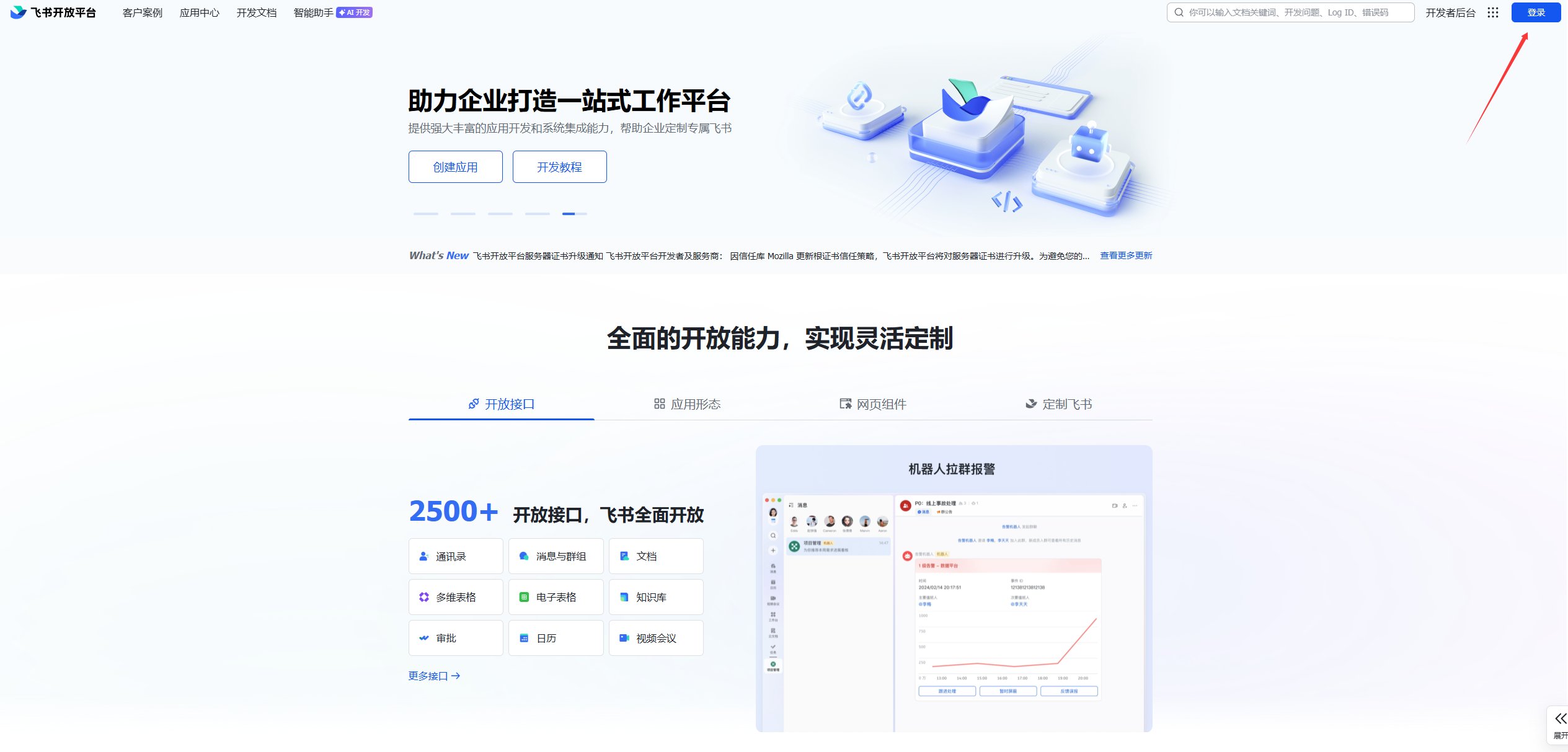
进入[飞书开放平台](https://open.feishu.cn/?lang=zh-CN)，注册并登录。

<Frame>
  <img src="https://mintcdn.com/123-1747710f/3ovM1GCpoeeCBhzh/images/image-44.png?fit=max&auto=format&n=3ovM1GCpoeeCBhzh&q=85&s=22c28e4784bcef1d8a3ce9c97fb50298" alt="Image" width="2529" height="1213" data-path="images/image-44.png" />
</Frame>

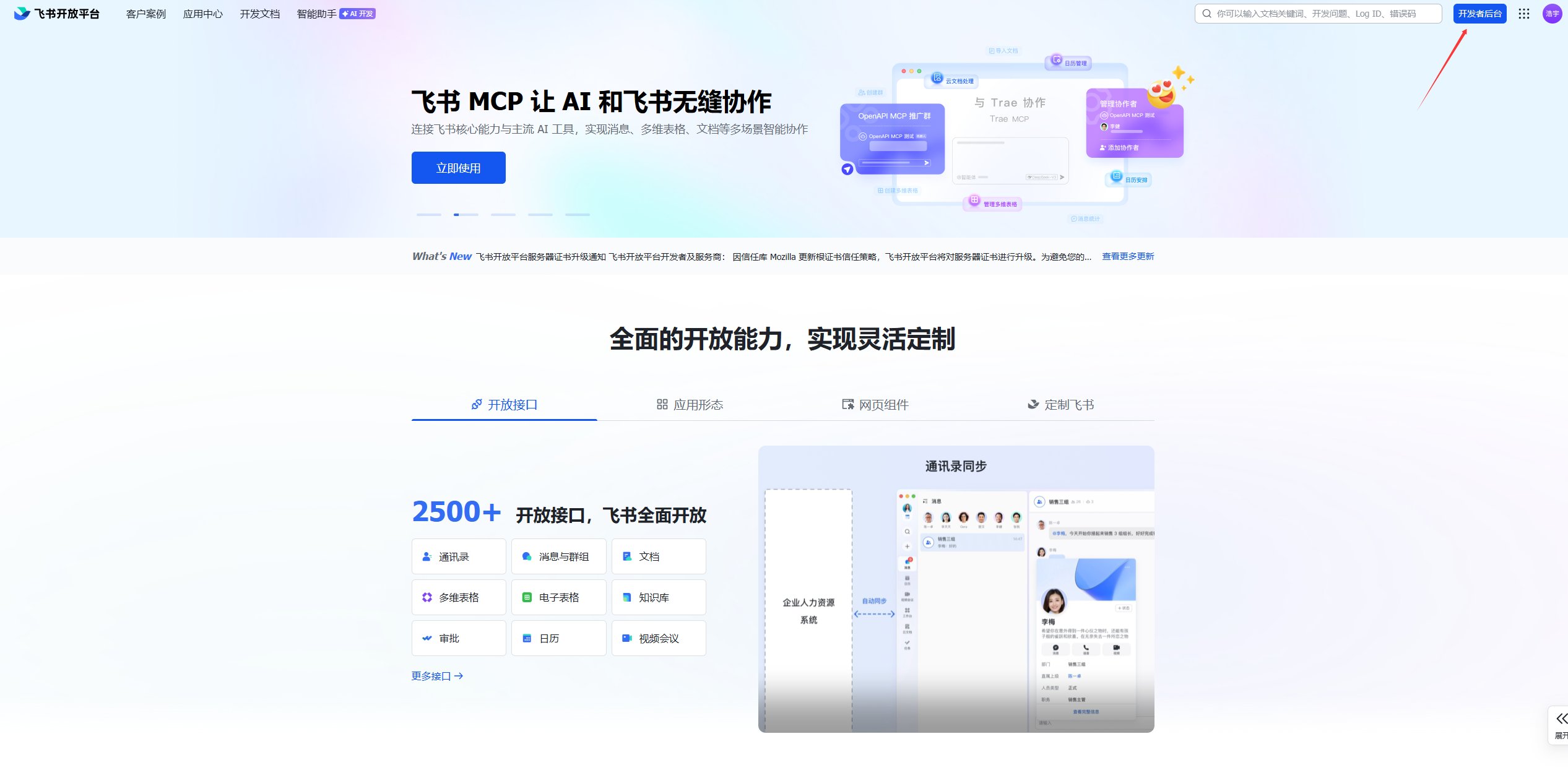
进入开发者后台。

<Frame>
  <img src="https://mintcdn.com/123-1747710f/J7qkiaidtJmc0Fsu/images/image-45.png?fit=max&auto=format&n=J7qkiaidtJmc0Fsu&q=85&s=3c52a9832e27e996ad3c2b04c5c44653" alt="Image" width="2533" height="1257" data-path="images/image-45.png" />
</Frame>

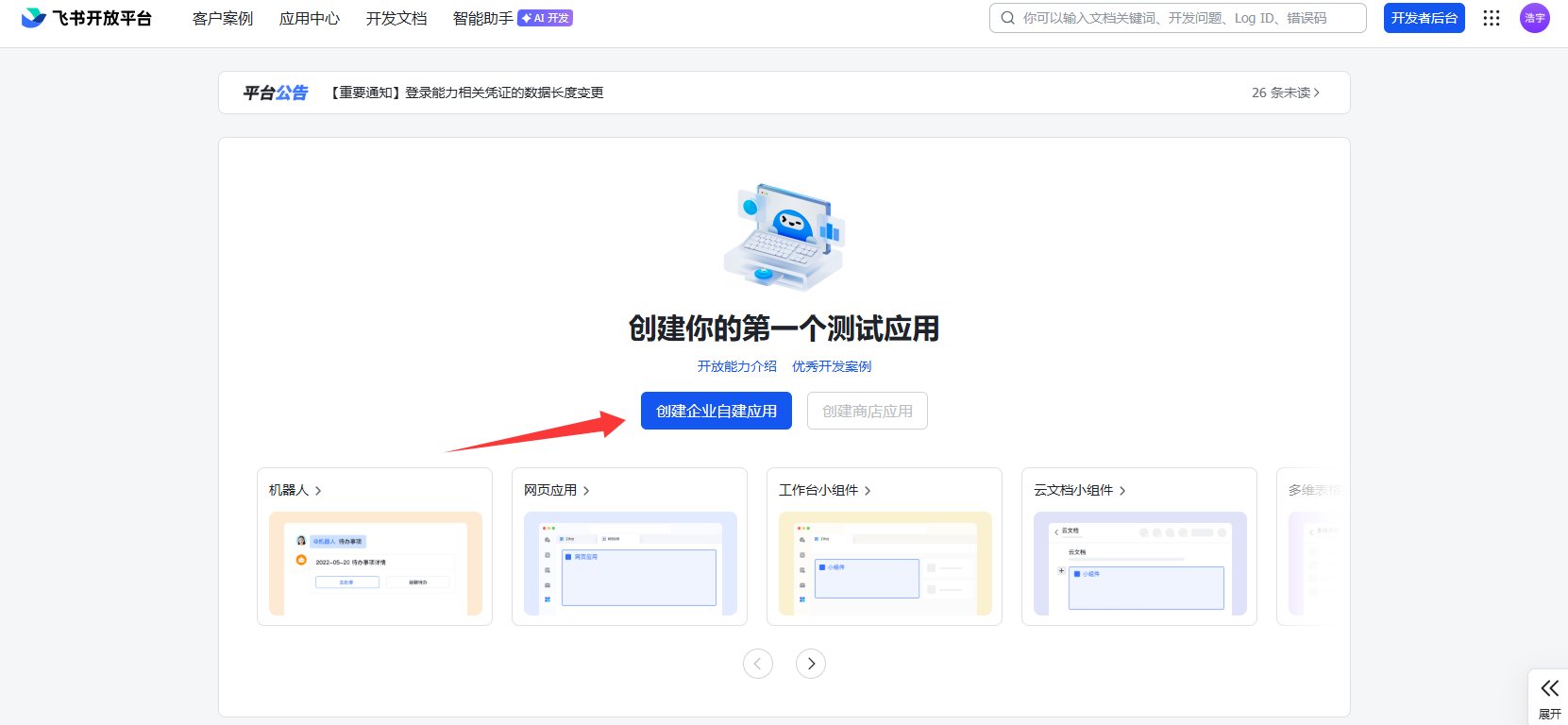
点击创建企业自建应用。

<Frame>
  <img src="https://mintcdn.com/123-1747710f/J7qkiaidtJmc0Fsu/images/image-46.png?fit=max&auto=format&n=J7qkiaidtJmc0Fsu&q=85&s=039be572b10c162b1041bd8382e3de3b" alt="Image" width="1661" height="768" data-path="images/image-46.png" />
</Frame>

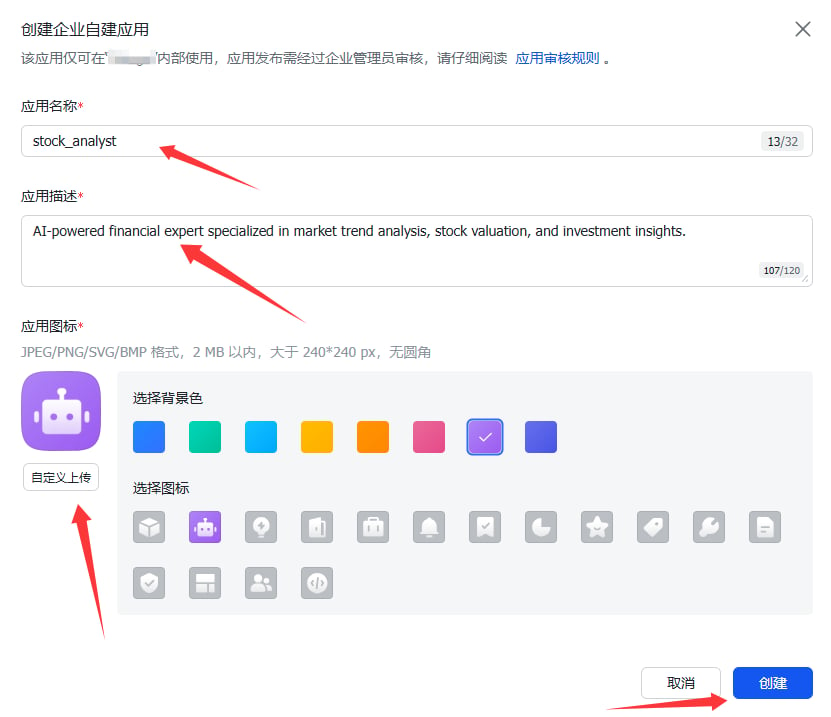
填写应用名称、应用描述并上传应用图标后，点击创建。

<Frame>
  <img src="https://mintcdn.com/123-1747710f/J7qkiaidtJmc0Fsu/images/image-47.png?fit=max&auto=format&n=J7qkiaidtJmc0Fsu&q=85&s=21407691605897b702077cbb23a4d817" alt="Image" width="831" height="717" data-path="images/image-47.png" />
</Frame>

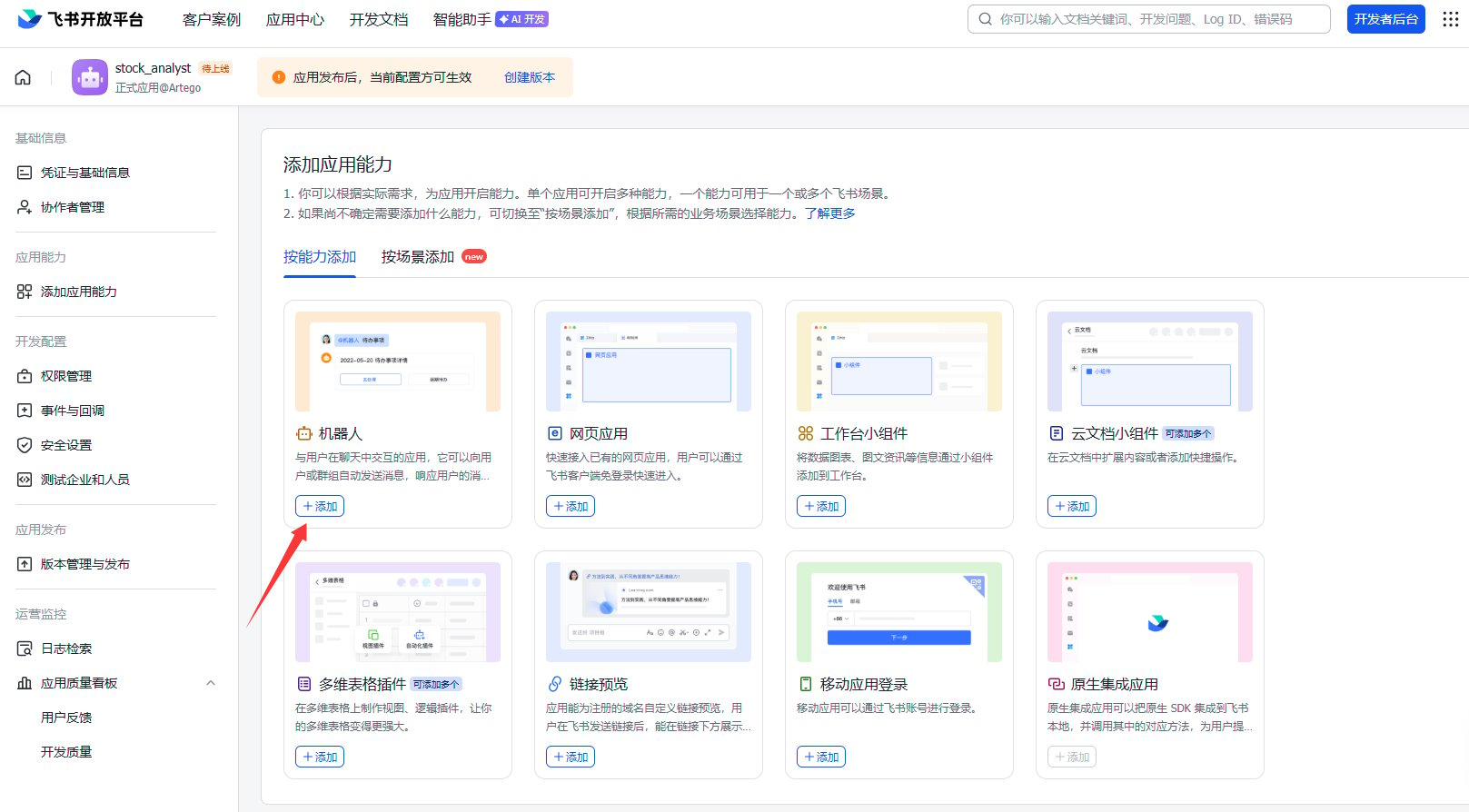
点击添加机器人能力，进入机器人配置。

<Frame>
  <img src="https://mintcdn.com/123-1747710f/n_HaomET0OrSGOwU/images/image-48.png?fit=max&auto=format&n=n_HaomET0OrSGOwU&q=85&s=61c4e6646091bf4d1580386084dabab6" alt="Image" width="1617" height="894" data-path="images/image-48.png" />
</Frame>

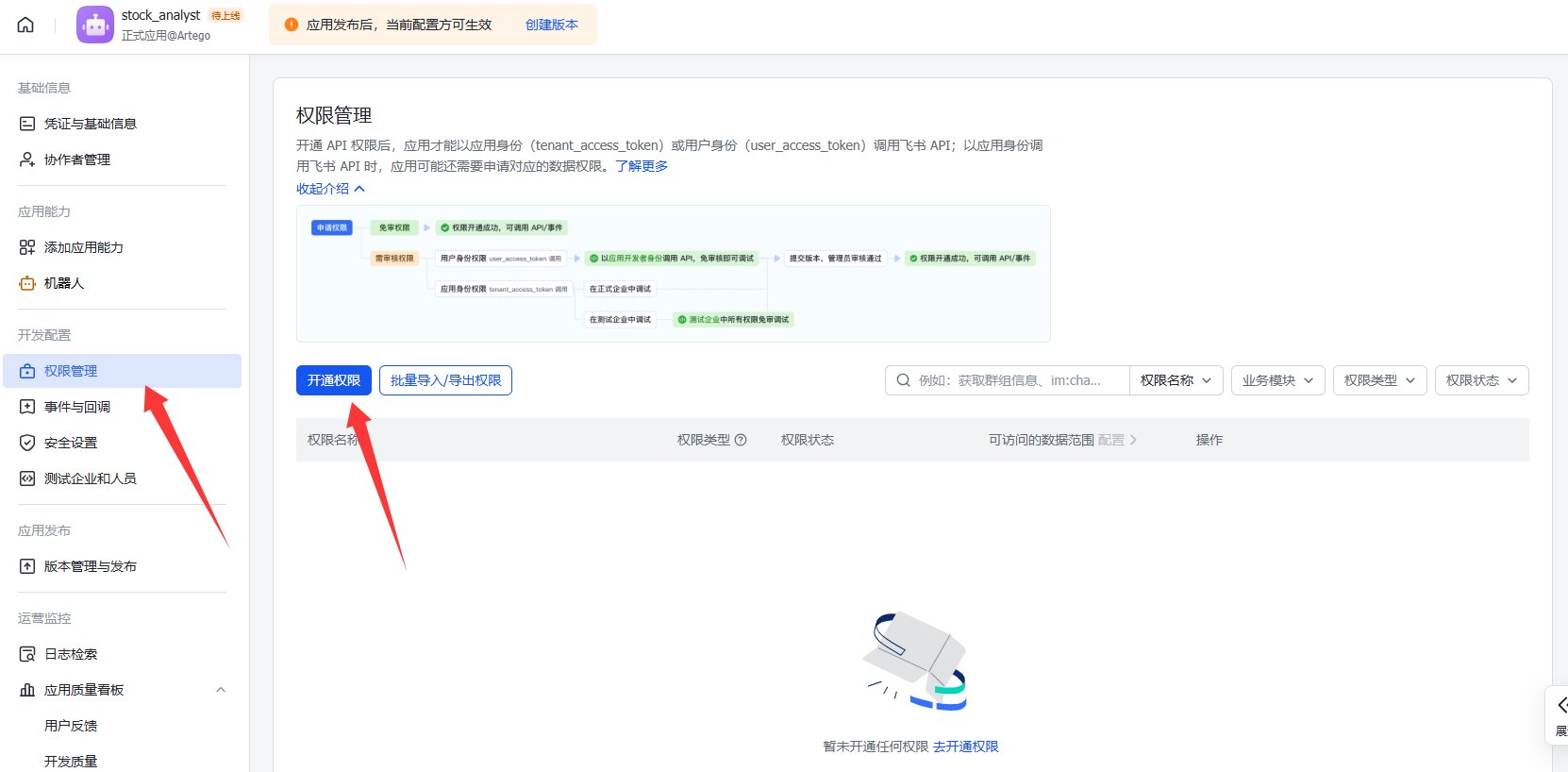
通过菜单栏进入权限管理页，点击开通权限。

<Frame>
  <img src="https://mintcdn.com/123-1747710f/n_HaomET0OrSGOwU/images/image-49.png?fit=max&auto=format&n=n_HaomET0OrSGOwU&q=85&s=579bfe65480975aa050e03f770620b8a" alt="Image" width="1662" height="818" data-path="images/image-49.png" />
</Frame>

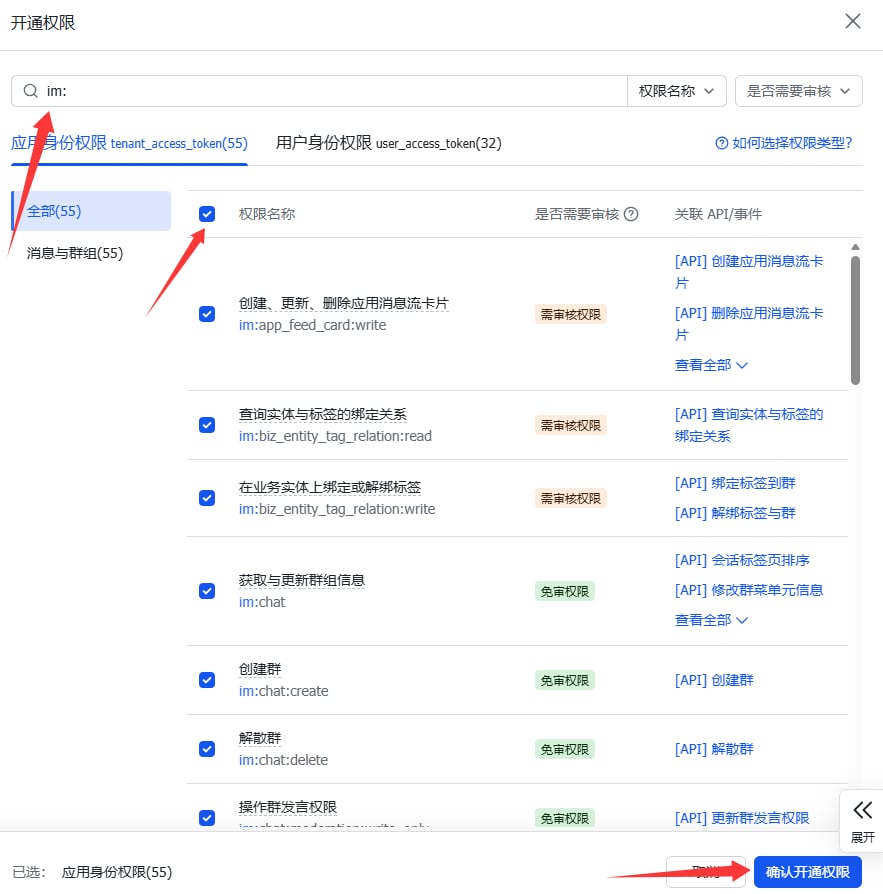
在权限搜索框中输入 im: 选择所需权限后确认开通。

<Frame>
  <img src="https://mintcdn.com/123-1747710f/n_HaomET0OrSGOwU/images/image-50.png?fit=max&auto=format&n=n_HaomET0OrSGOwU&q=85&s=4ddf9a49342259b4be738fd512b717a2" alt="Image" width="883" height="894" data-path="images/image-50.png" />
</Frame>

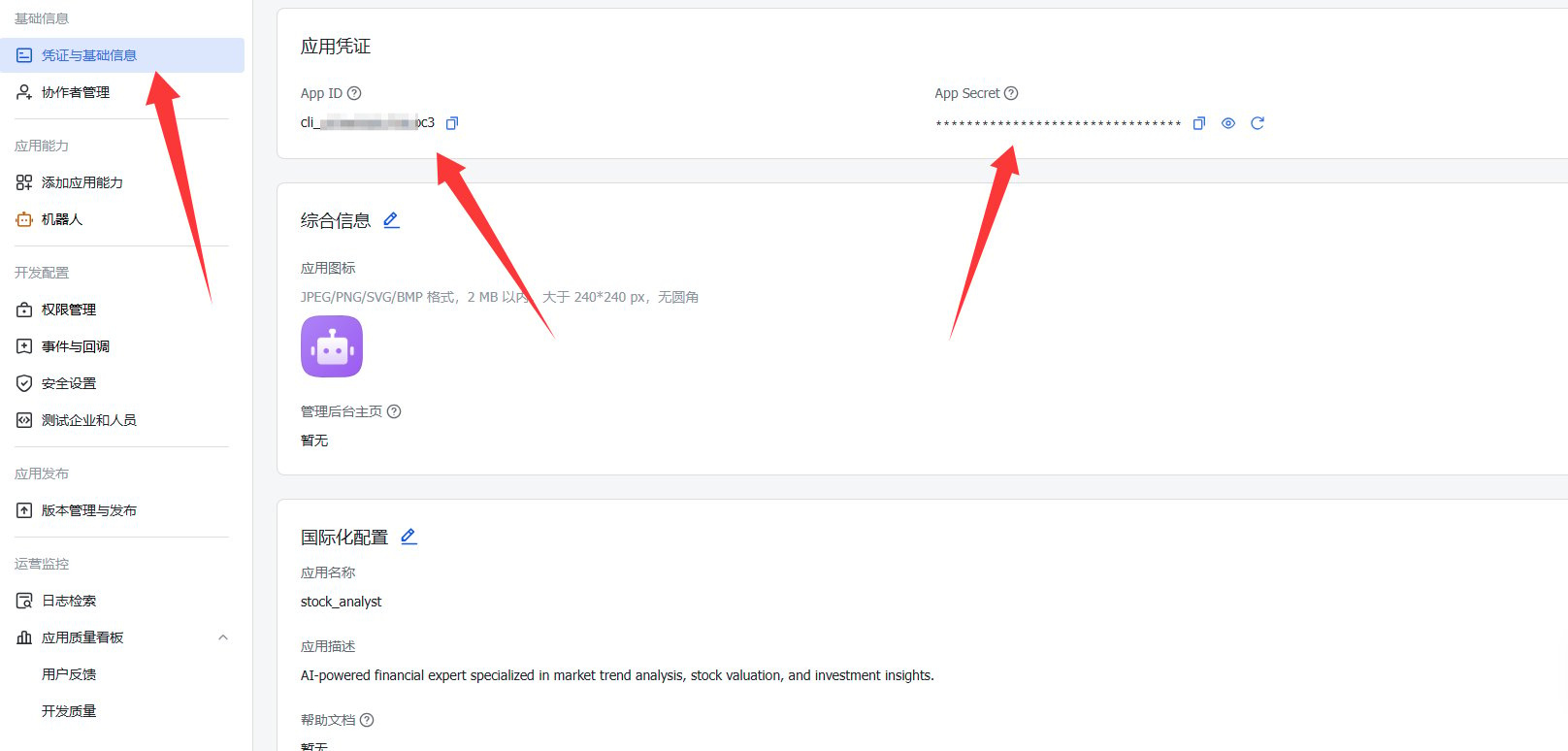
进入凭证与基础信息页，查看App ID和App Secret。

<Frame>
  <img src="https://mintcdn.com/123-1747710f/Hl5LdbuVAN-LOQci/images/image-53.png?fit=max&auto=format&n=Hl5LdbuVAN-LOQci&q=85&s=701264794ae0975eb223b8a33364cccd" alt="Image" width="1616" height="774" data-path="images/image-53.png" />
</Frame>

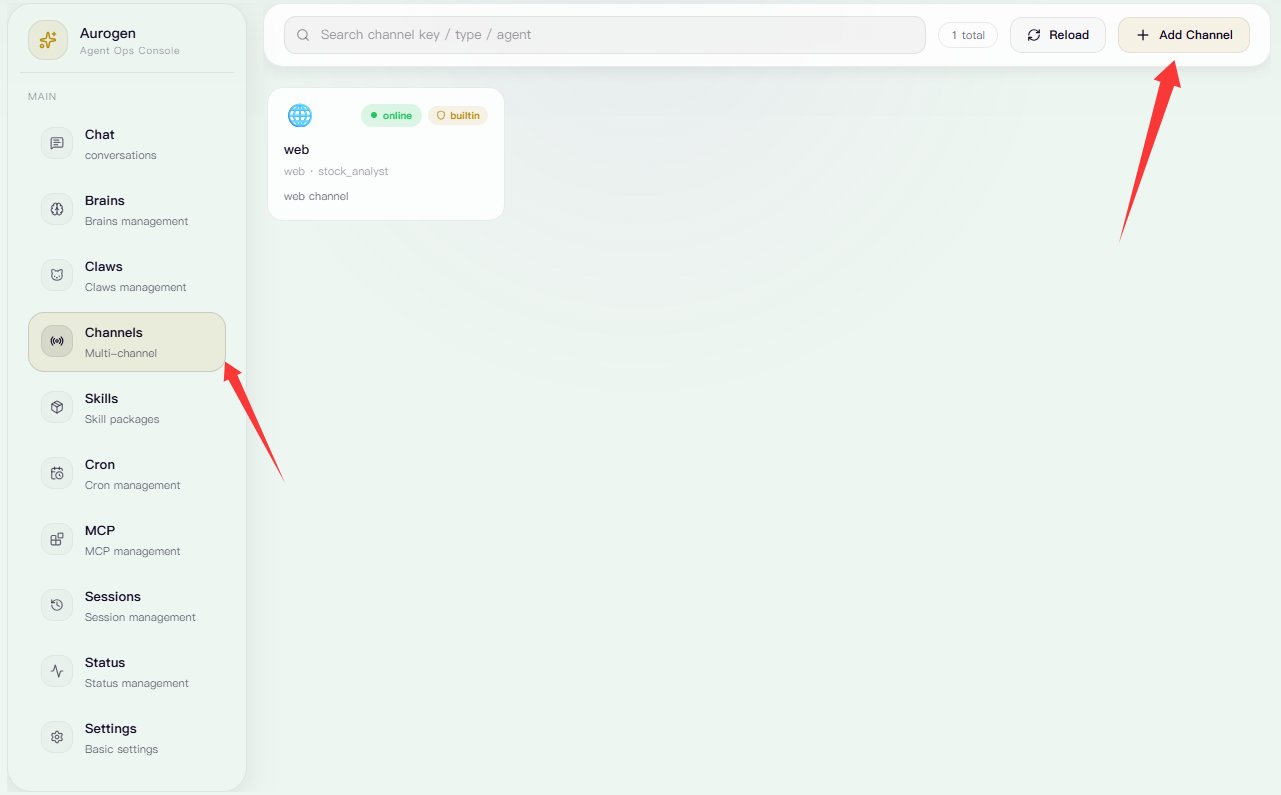
进入Aurogen\_web Channels页，点击右上角”添加Channel“。

<Frame>
  <img src="https://mintcdn.com/123-1747710f/Hl5LdbuVAN-LOQci/images/image-55.png?fit=max&auto=format&n=Hl5LdbuVAN-LOQci&q=85&s=a230d6c3140948f292b956a8b98f52a5" alt="Image" width="1281" height="795" data-path="images/image-55.png" />
</Frame>

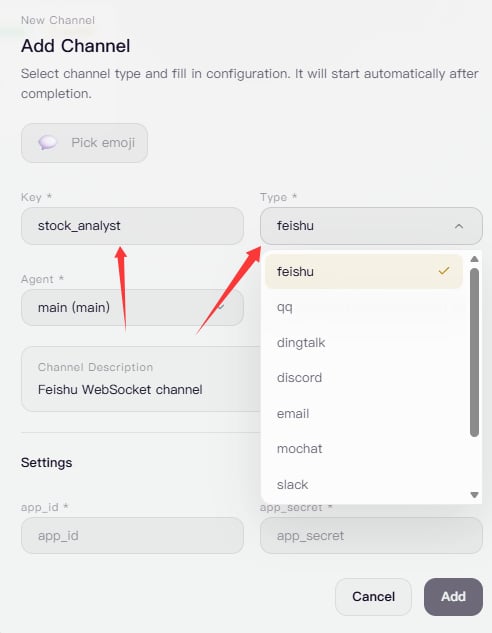
选择类型为feishu，填写该 Channel 的唯一标识名称（不可重复）。

<Frame>
  <img src="https://mintcdn.com/123-1747710f/b12RgePIYds-PIwH/images/image-56.png?fit=max&auto=format&n=b12RgePIYds-PIwH&q=85&s=531894342436f6285f6f44063d9fd4f4" alt="Image" width="492" height="633" data-path="images/image-56.png" />
</Frame>

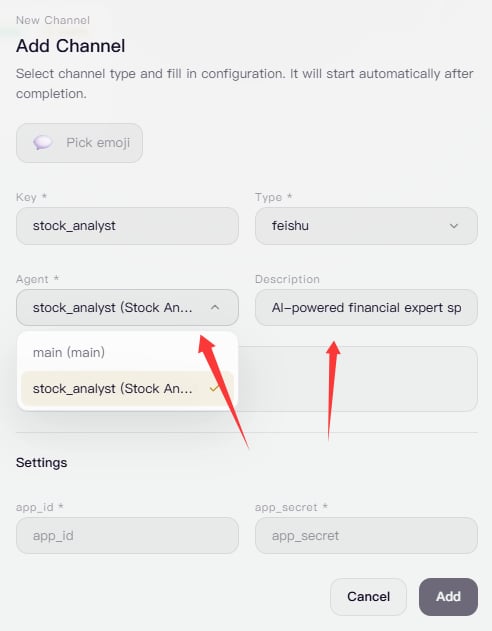
选择Channel对应的Claw并输入描述文字。

<Frame>
  <img src="https://mintcdn.com/123-1747710f/poE6u7E1UtCZfaGq/images/image-57.png?fit=max&auto=format&n=poE6u7E1UtCZfaGq&q=85&s=dda64dffd96d30017244915b67150376" alt="Image" width="492" height="631" data-path="images/image-57.png" />
</Frame>

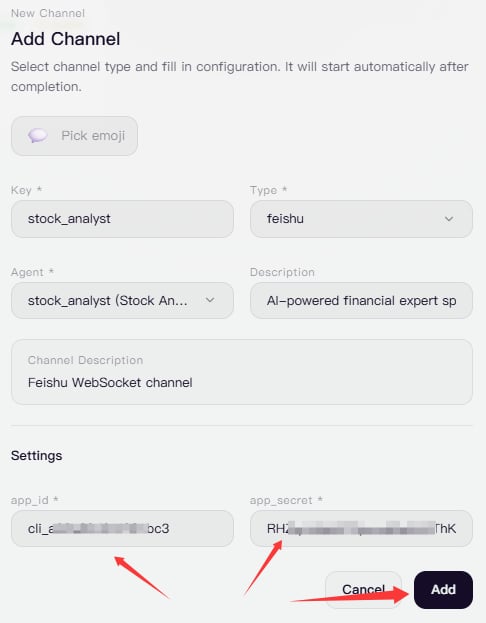
在飞书开放平台的“凭证与基础信息”页面中获取 App ID 和 App Secret，并将其填写到对应的 Channel 配置项中。填写完成后，点击添加，即可完成 Channel 创建。

<Frame>
  <img src="https://mintcdn.com/123-1747710f/poE6u7E1UtCZfaGq/images/image-58.png?fit=max&auto=format&n=poE6u7E1UtCZfaGq&q=85&s=9baa1a2223b81ad0a876cbaddba0dcbd" alt="Image" width="486" height="623" data-path="images/image-58.png" />
</Frame>

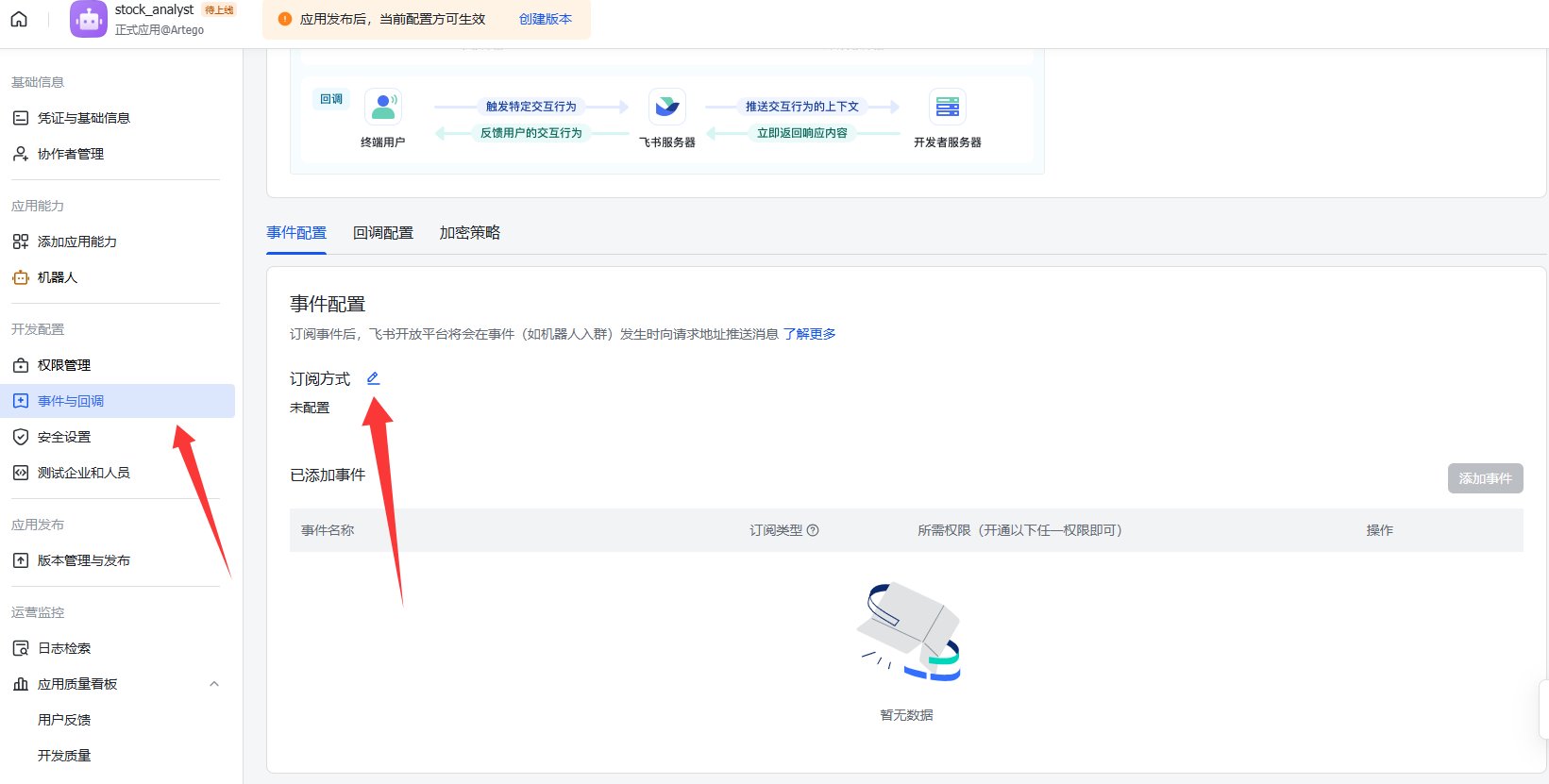
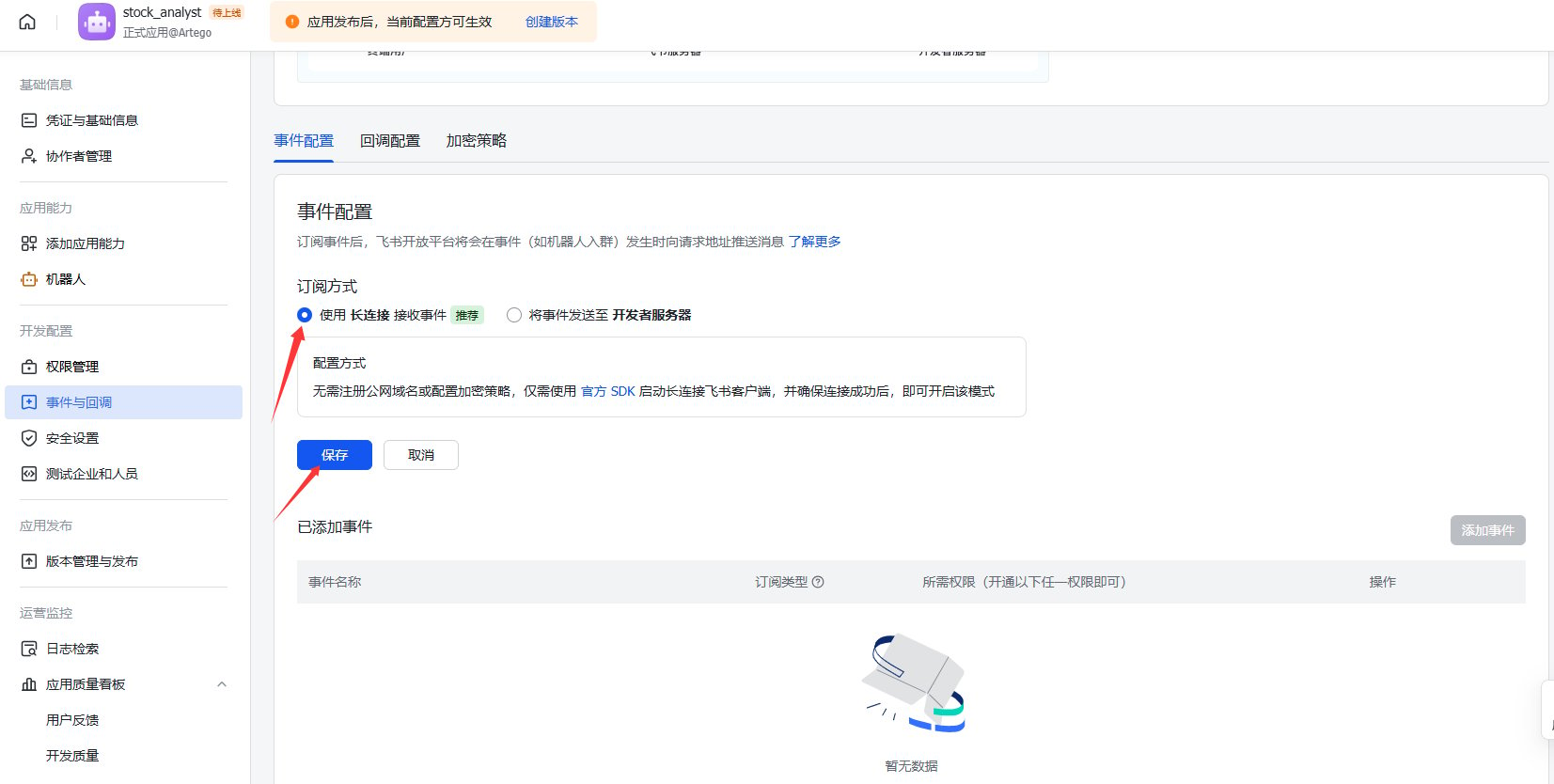
在确保 Aurogen 后台正常运行的前提下，进入飞书开放平台的事件与回调页面，勾选“使用长连接接收事件”后点击保存。

<Frame>
  <img src="https://mintcdn.com/123-1747710f/Hl5LdbuVAN-LOQci/images/image-51.png?fit=max&auto=format&n=Hl5LdbuVAN-LOQci&q=85&s=99c3cfaefb39f10c913985bbdb93bec8" alt="Image" width="1641" height="831" data-path="images/image-51.png" />
</Frame>

选择使用长连接接收事件后保存。

<Frame>
  <img src="https://mintcdn.com/123-1747710f/Hl5LdbuVAN-LOQci/images/image-52.png?fit=max&auto=format&n=Hl5LdbuVAN-LOQci&q=85&s=5e93f9ff06c795941198ba6123560544" alt="Image" width="1653" height="834" data-path="images/image-52.png" />
</Frame>

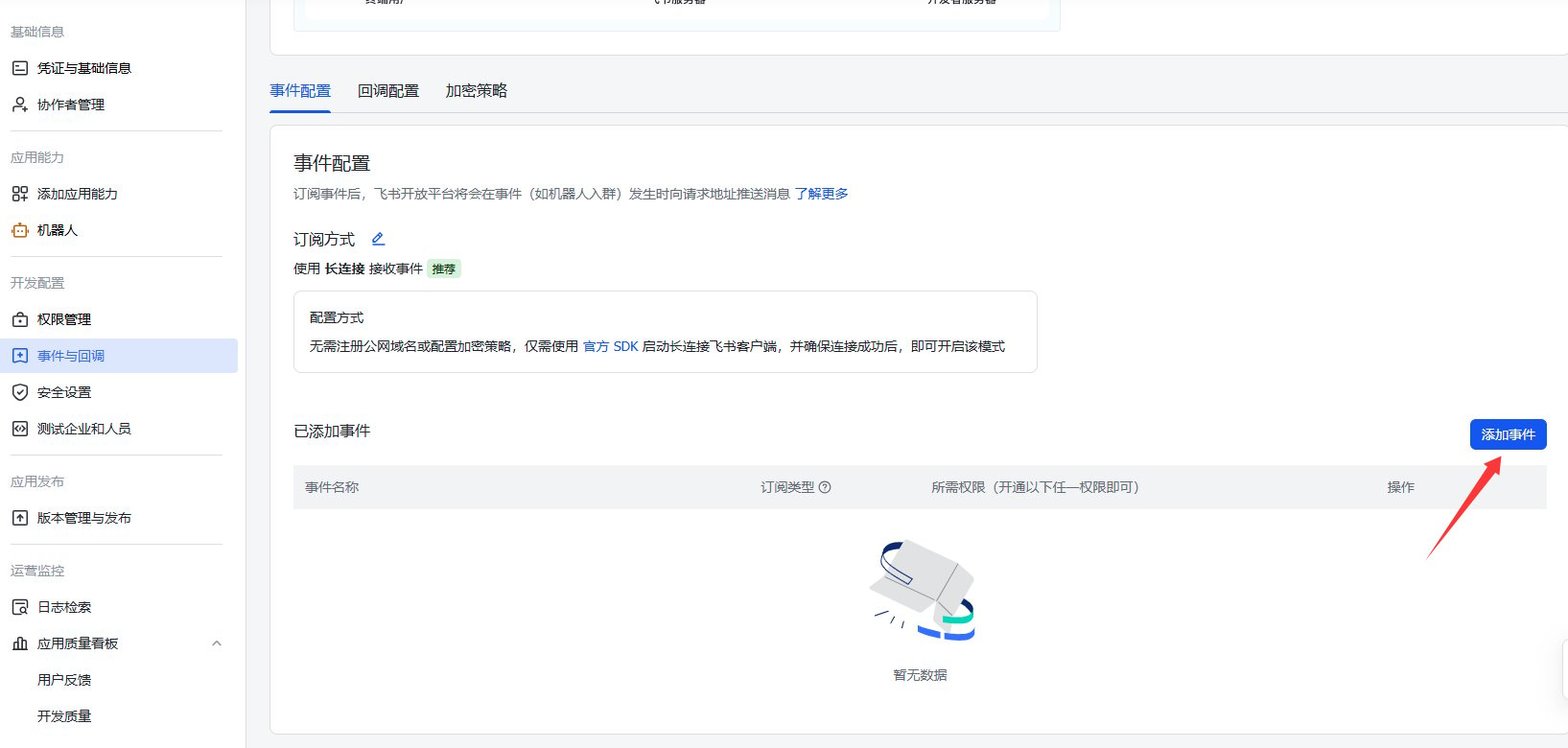
点击右下角的“添加事件”。

<Frame>
  <img src="https://mintcdn.com/123-1747710f/tBVk7J740y2TnA0v/images/image-63.png?fit=max&auto=format&n=tBVk7J740y2TnA0v&q=85&s=d9f6704ba6ff05f70906191ee67e748c" alt="Image" width="1635" height="780" data-path="images/image-63.png" />
</Frame>

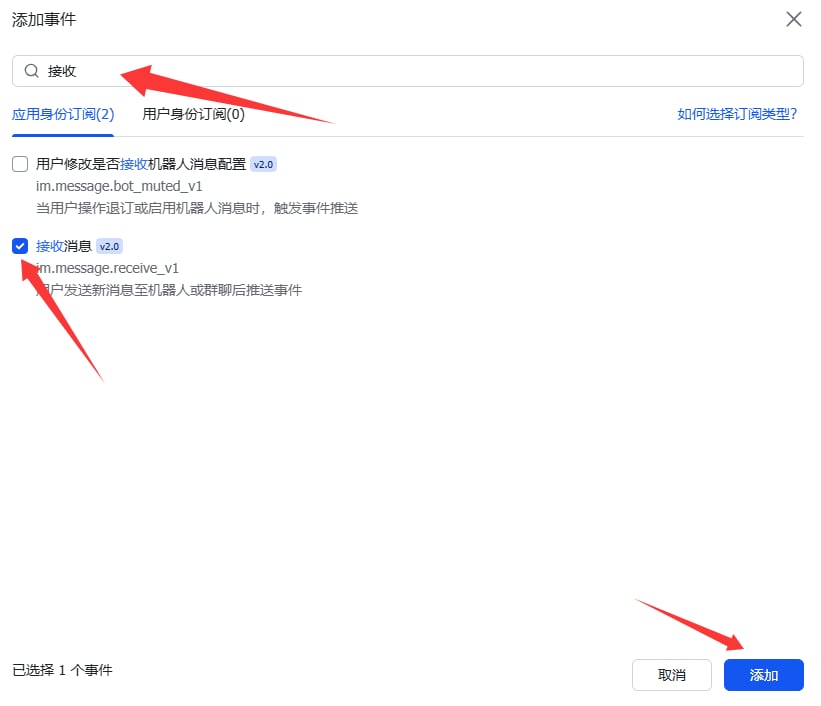
搜索“接收”，勾选“接收消息”相关事件后，点击右下角“添加”完成事件配置。

<Frame>
  <img src="https://mintcdn.com/123-1747710f/tBVk7J740y2TnA0v/images/image-64.png?fit=max&auto=format&n=tBVk7J740y2TnA0v&q=85&s=ca38f7d7364e59be1137151e5e09f472" alt="Image" width="821" height="706" data-path="images/image-64.png" />
</Frame>

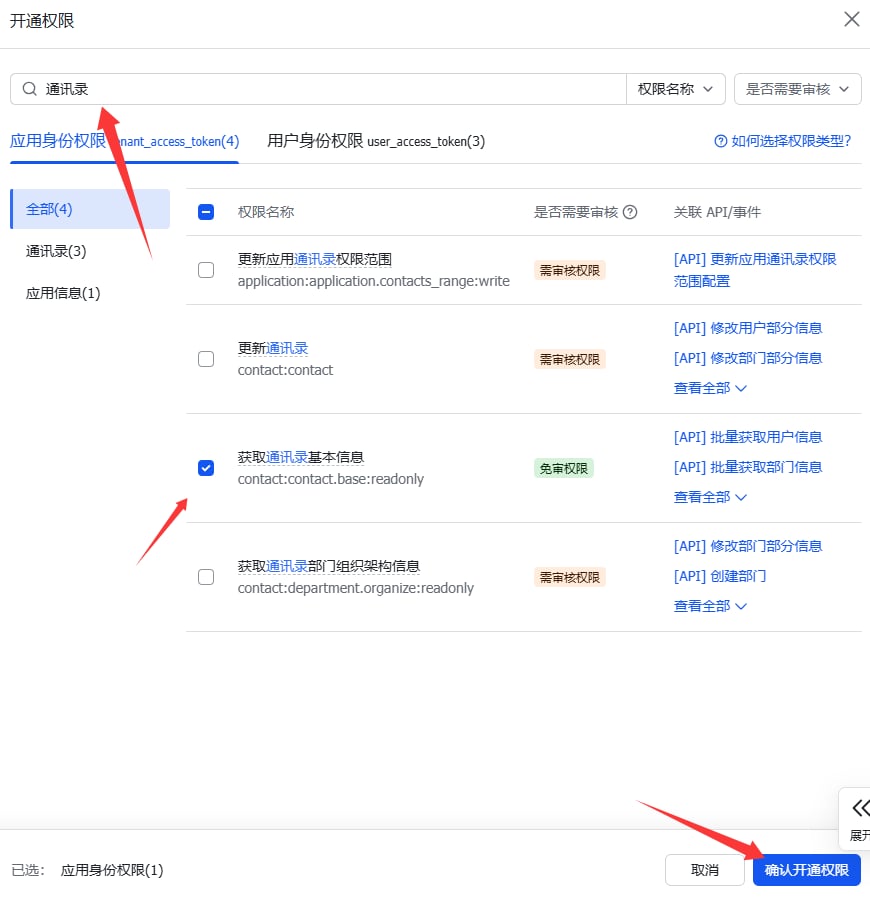
搜索“通讯录”后，添加“获取通讯录基本信息”权限。

<Frame>
  <img src="https://mintcdn.com/123-1747710f/tBVk7J740y2TnA0v/images/image-65.png?fit=max&auto=format&n=tBVk7J740y2TnA0v&q=85&s=8fafc679423a6a379ae8c86d738a5329" alt="Image" width="870" height="909" data-path="images/image-65.png" />
</Frame>

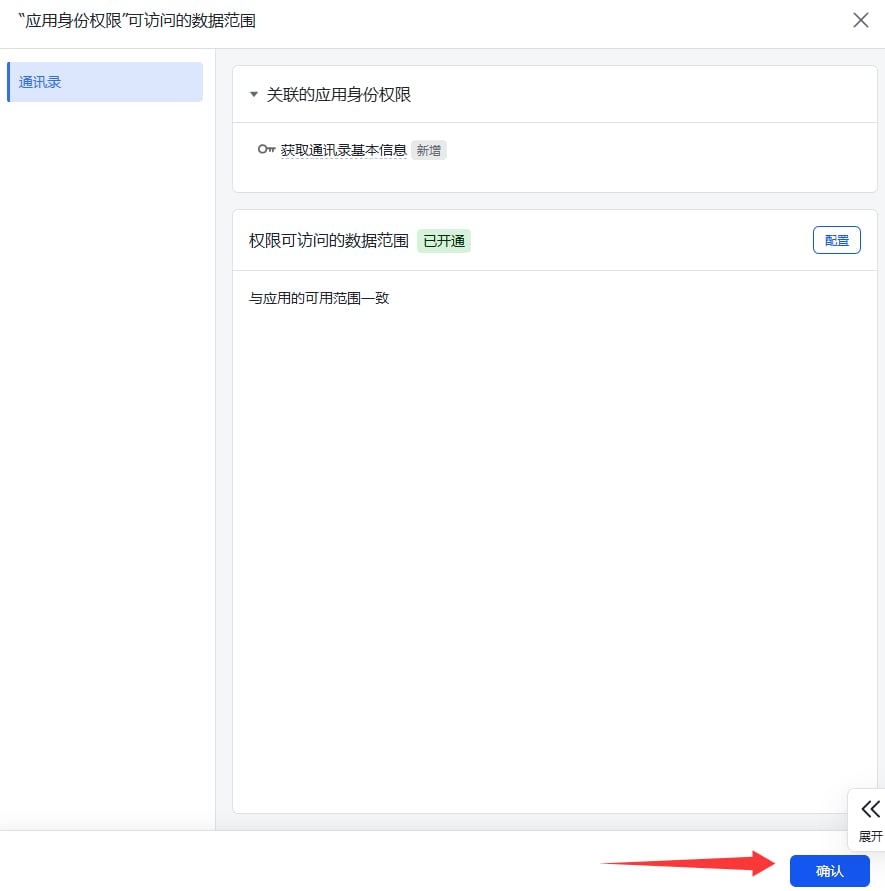
点击确认完成权限添加。

<Frame>
  <img src="https://mintcdn.com/123-1747710f/tBVk7J740y2TnA0v/images/image-66.png?fit=max&auto=format&n=tBVk7J740y2TnA0v&q=85&s=bde73640edcff54a7843741dcd72457d" alt="Image" width="885" height="891" data-path="images/image-66.png" />
</Frame>

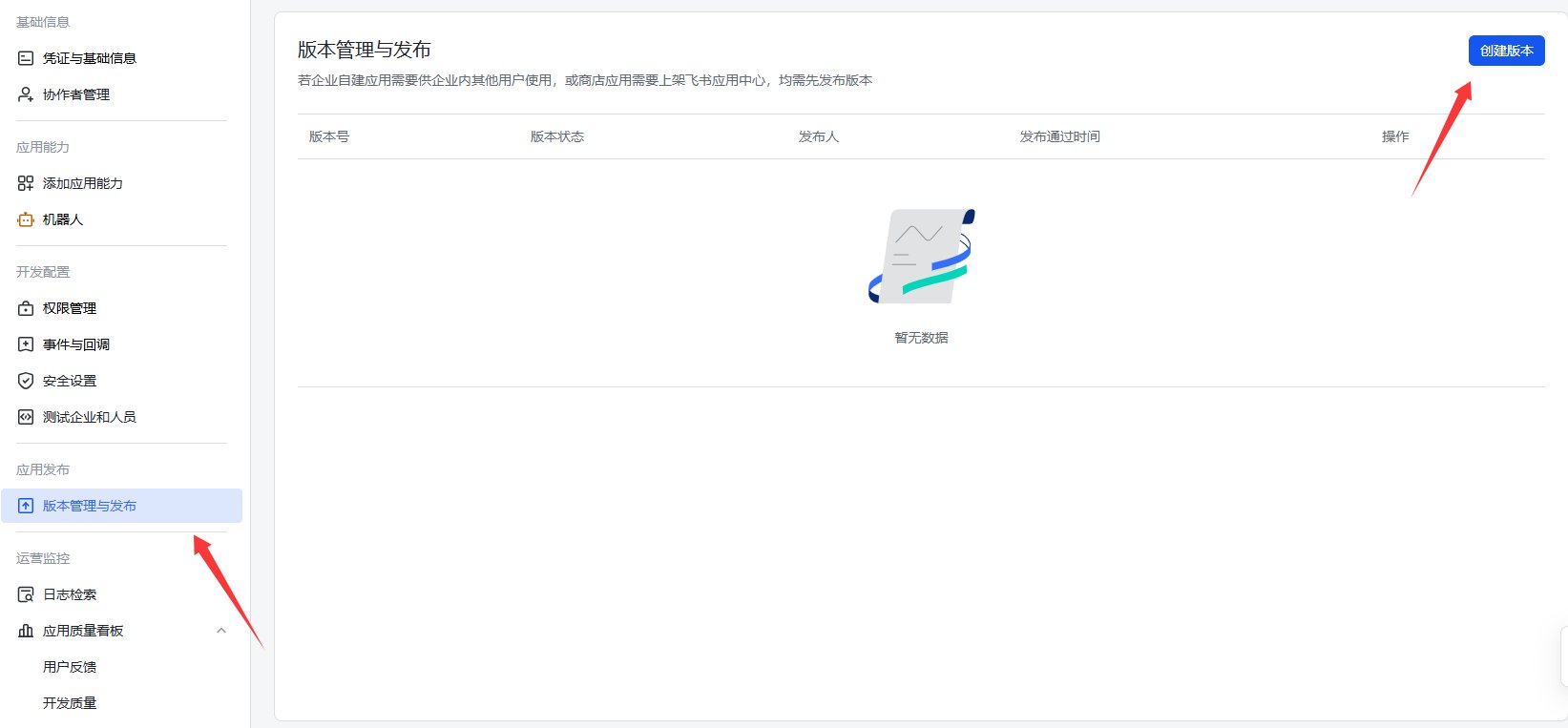
进入“版本管理与发布”页面，点击右上角“创建版本”。

<Frame>
  <img src="https://mintcdn.com/123-1747710f/tBVk7J740y2TnA0v/images/image-67.png?fit=max&auto=format&n=tBVk7J740y2TnA0v&q=85&s=7dde4a9432223e60c9c24ff1dd32a417" alt="Image" width="1643" height="763" data-path="images/image-67.png" />
</Frame>

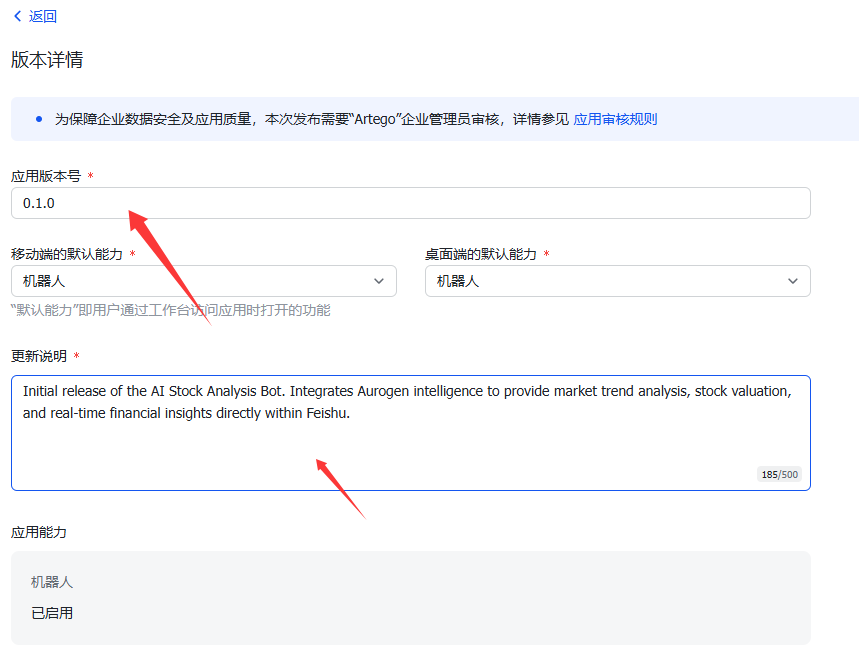
填写版本号和更新说明。

<Frame>
  <img src="https://mintcdn.com/123-1747710f/tBVk7J740y2TnA0v/images/image-68.png?fit=max&auto=format&n=tBVk7J740y2TnA0v&q=85&s=4096b0e4d4de14160c07f3604da8414c" alt="Image" width="859" height="669" data-path="images/image-68.png" />
</Frame>

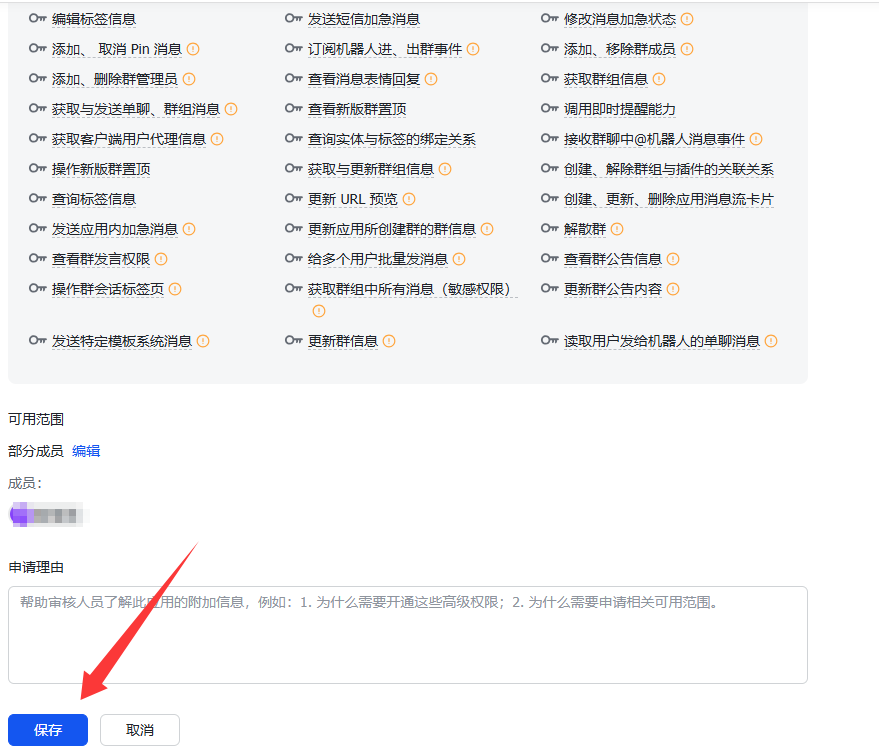
下拉页面并点击保存。

<Frame>
  <img src="https://mintcdn.com/123-1747710f/tBVk7J740y2TnA0v/images/image-69.png?fit=max&auto=format&n=tBVk7J740y2TnA0v&q=85&s=7c2f14848ebca14ecb516f206149310b" alt="Image" width="879" height="750" data-path="images/image-69.png" />
</Frame>

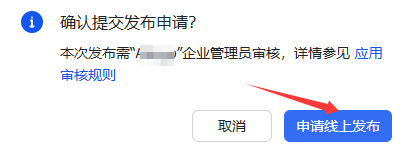
保存完成后，点击“申请线上发布”。

<Frame>
  <img src="https://mintcdn.com/123-1747710f/tBVk7J740y2TnA0v/images/image-70.png?fit=max&auto=format&n=tBVk7J740y2TnA0v&q=85&s=9580dfe6424948e5fa4a75e9315d927e" alt="Image" width="407" height="165" data-path="images/image-70.png" />
</Frame>

### 审核应用

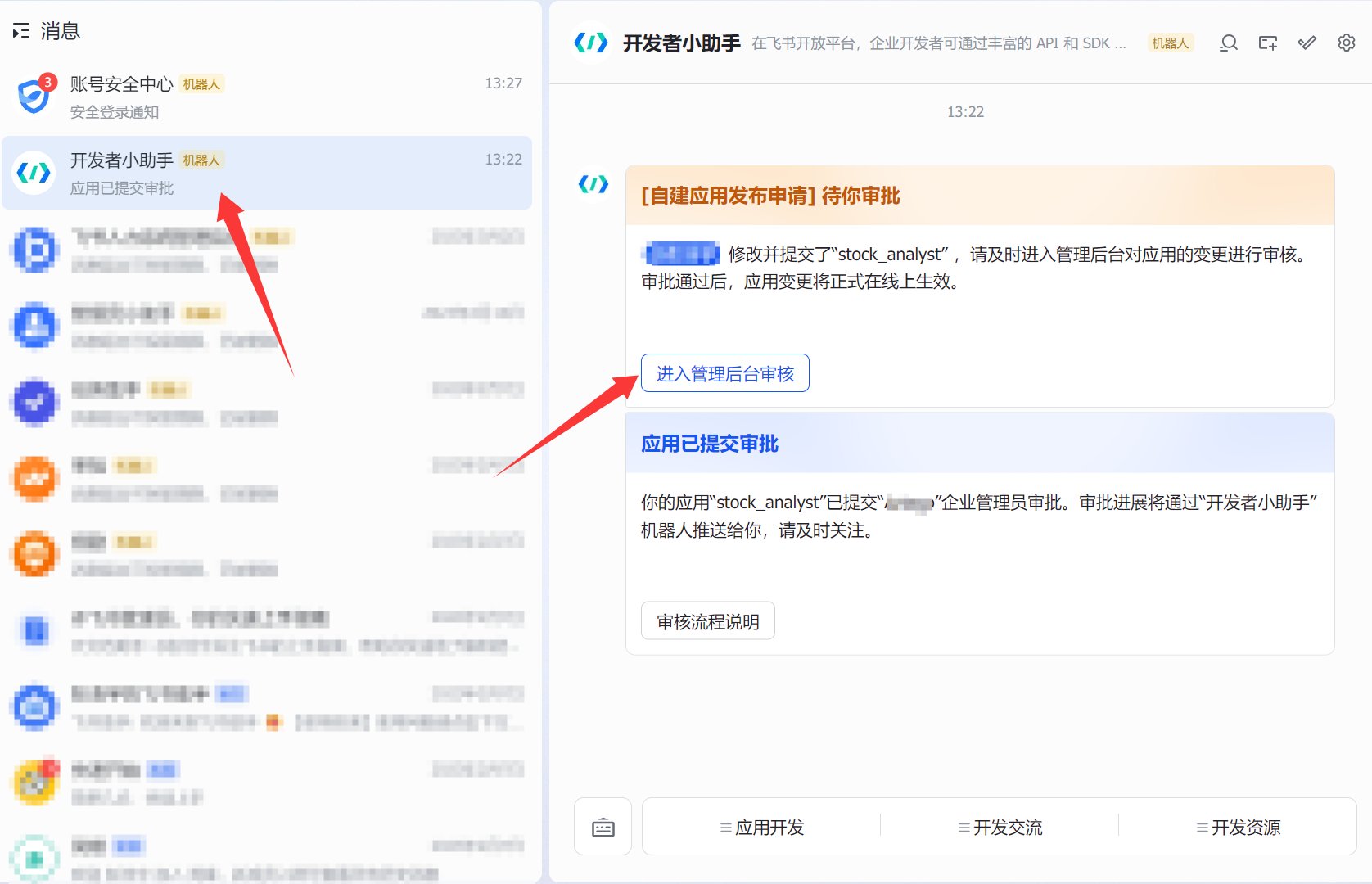
进入飞书 App，打开“飞书开发者小助手”，点击“进入后台审核流程”。

<Frame>
  <img src="https://mintcdn.com/123-1747710f/zHL3KgHiIPDSRuuG/images/image-74.png?fit=max&auto=format&n=zHL3KgHiIPDSRuuG&q=85&s=72ddc975b900618ba36d71e67a95affa" alt="Image" width="1676" height="1080" data-path="images/image-74.png" />
</Frame>

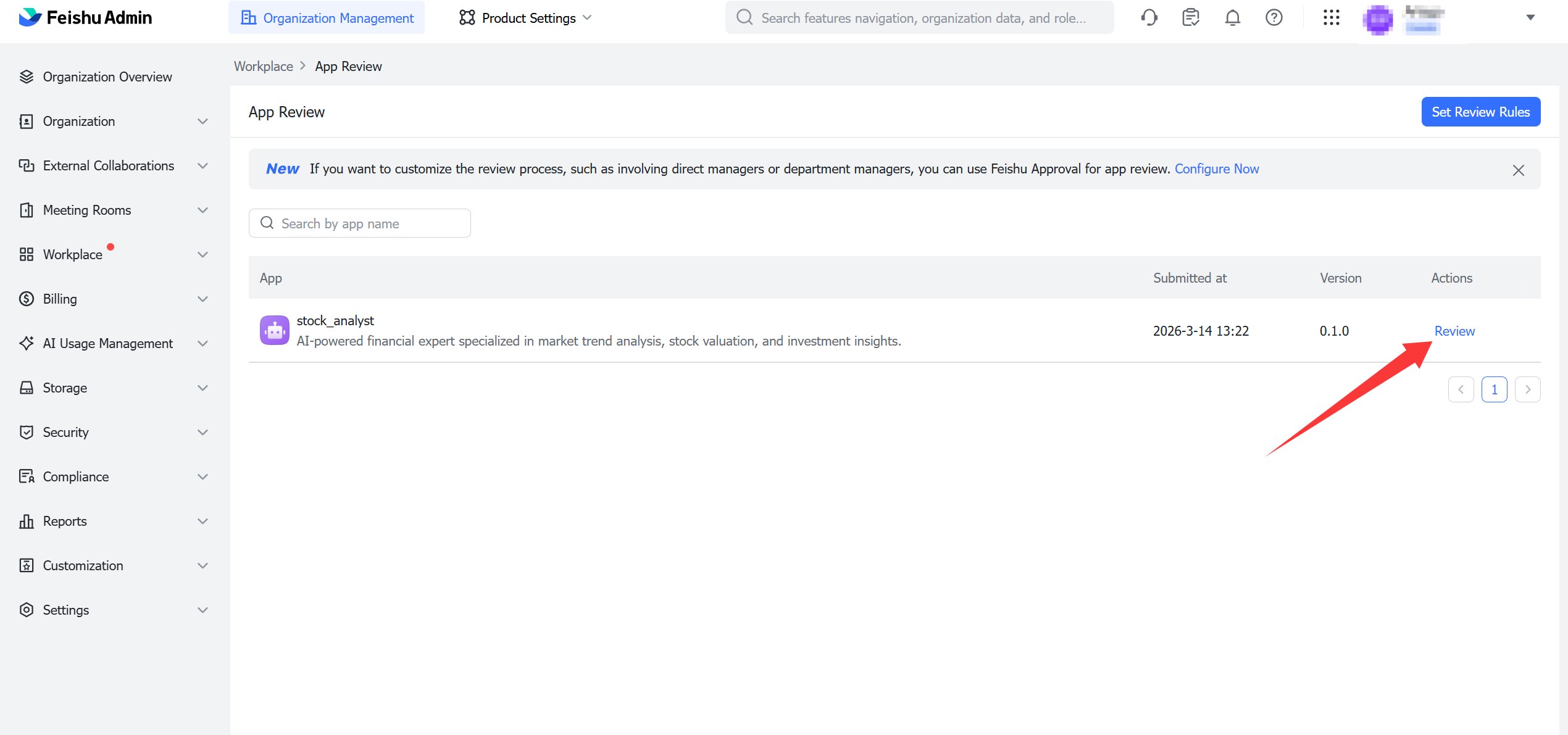
点击审核查看待审内容

<Frame>
  <img src="https://mintcdn.com/123-1747710f/eeXLpY7kSeZ2uB2W/images/image-75.png?fit=max&auto=format&n=eeXLpY7kSeZ2uB2W&q=85&s=0799a36be2e3a429968c0f3f58858606" alt="Image" width="2540" height="1191" data-path="images/image-75.png" />
</Frame>

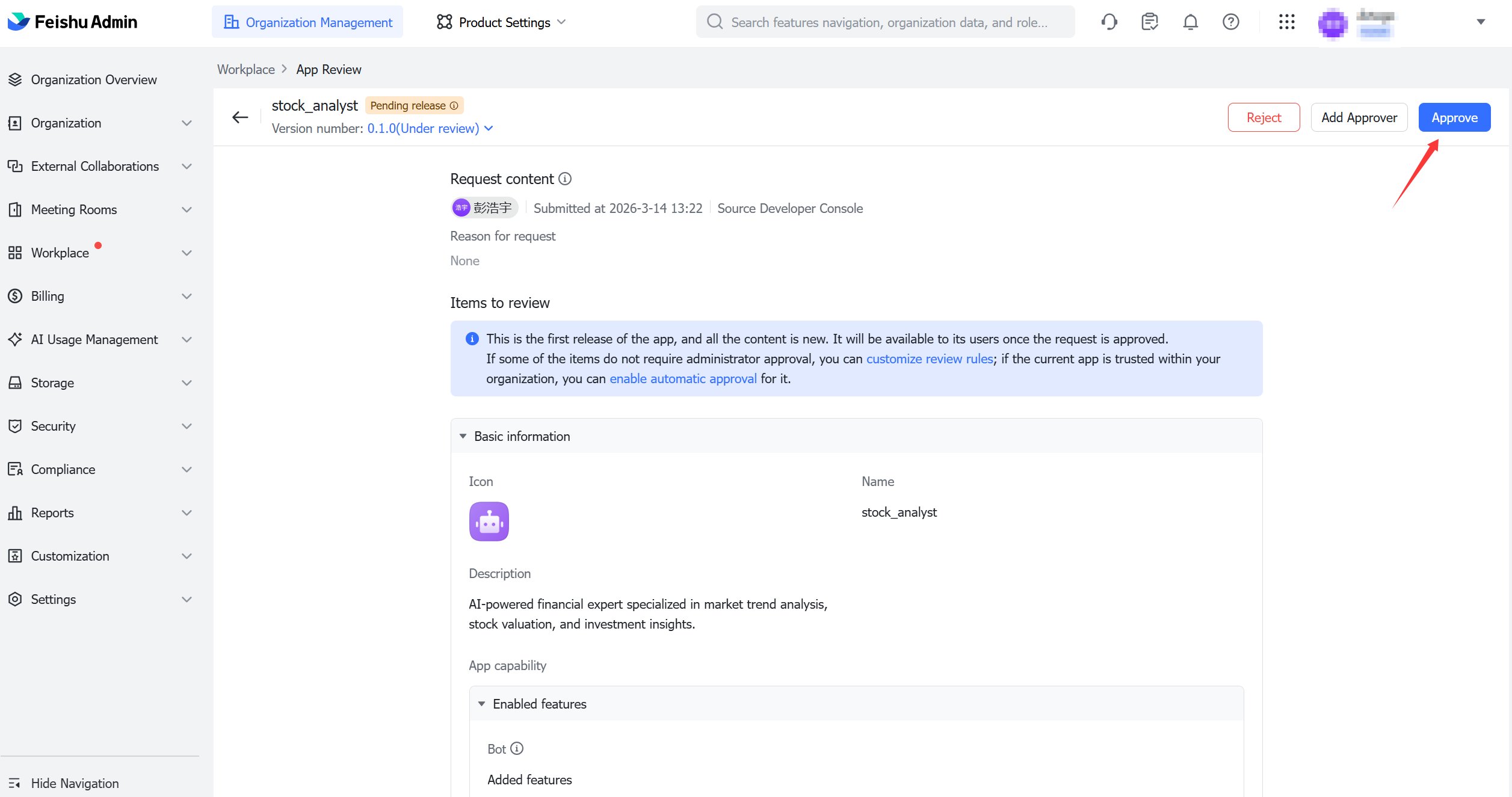
点击通过即可发布机器人。

<Frame>
  <img src="https://mintcdn.com/123-1747710f/eeXLpY7kSeZ2uB2W/images/image-76.png?fit=max&auto=format&n=eeXLpY7kSeZ2uB2W&q=85&s=932a9ba0143d1a057c10c333bb6da217" alt="Image" width="2513" height="1325" data-path="images/image-76.png" />
</Frame>

### 测试

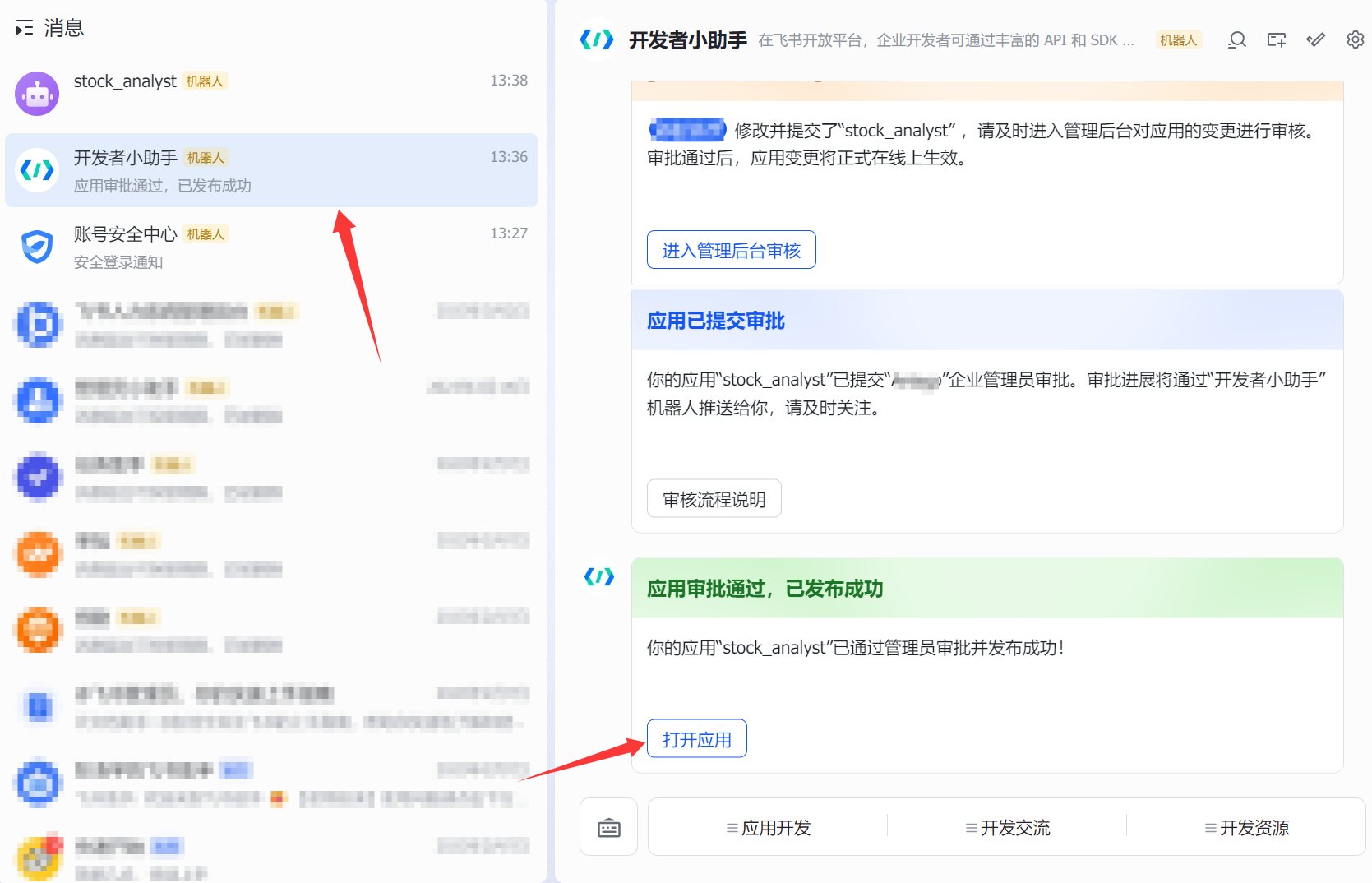
审批通过后，在开发者小助手中点击打开应用。

<Frame>
  <img src="https://mintcdn.com/123-1747710f/eeXLpY7kSeZ2uB2W/images/image-77.png?fit=max&auto=format&n=eeXLpY7kSeZ2uB2W&q=85&s=9d1ed2f28e0836d2bcd43cc9a2e992f4" alt="Image" width="1669" height="1074" data-path="images/image-77.png" />
</Frame>

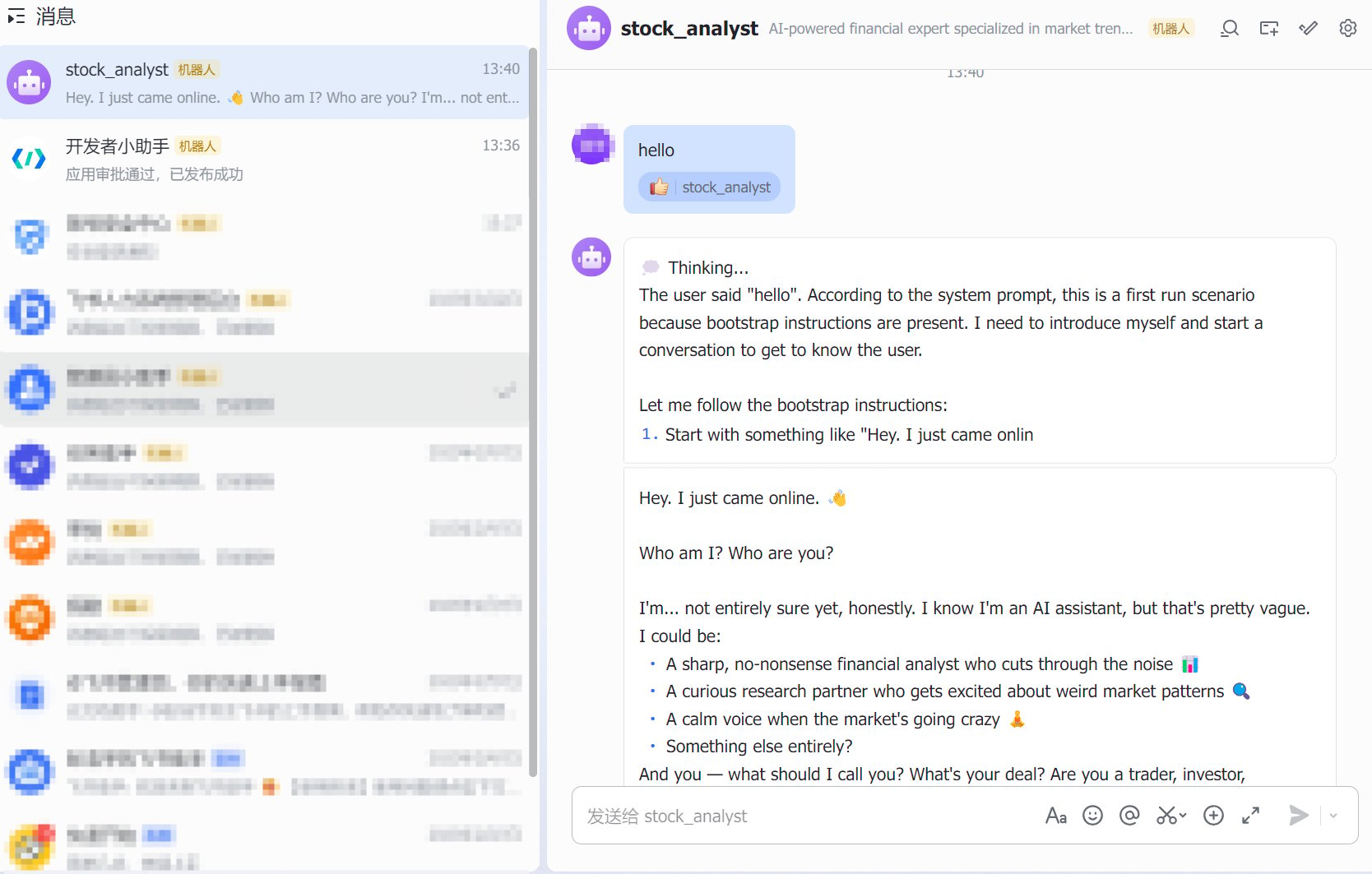
即可开始对话

<Frame>
  <img src="https://mintcdn.com/123-1747710f/eeXLpY7kSeZ2uB2W/images/image-78.png?fit=max&auto=format&n=eeXLpY7kSeZ2uB2W&q=85&s=87a2208bff90272779e0fd74f6b98b29" alt="Image" width="1668" height="1063" data-path="images/image-78.png" />
</Frame>

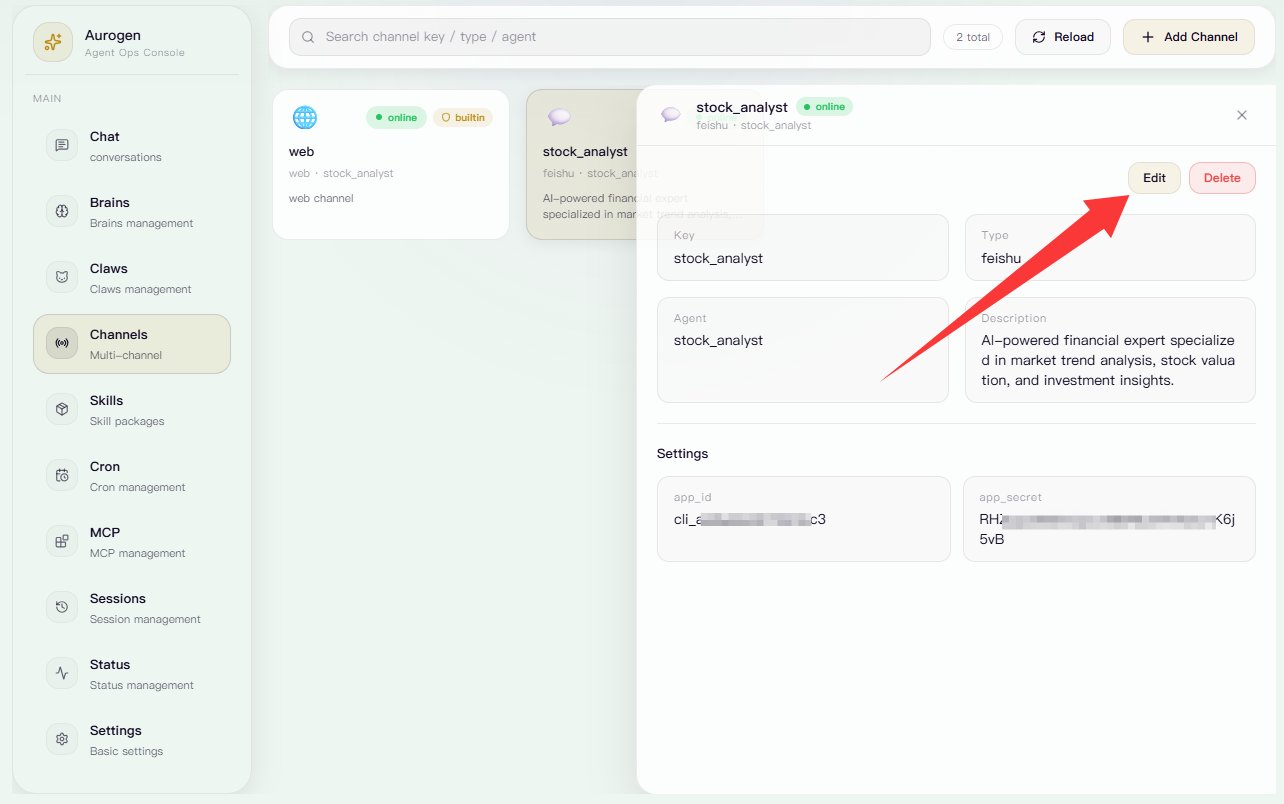
### 修改Channel

点击“编辑”即可进入 Channel 修改页面。
<Frame>
  <img src="https://mintcdn.com/123-1747710f/hicXfbE48ouSJ5OY/images/image-59.png?fit=max&auto=format&n=hicXfbE48ouSJ5OY&q=85&s=62217132e428f1dda525603a7713b18f" alt="Image" width="1284" height="804" data-path="images/image-59.png" />
</Frame>

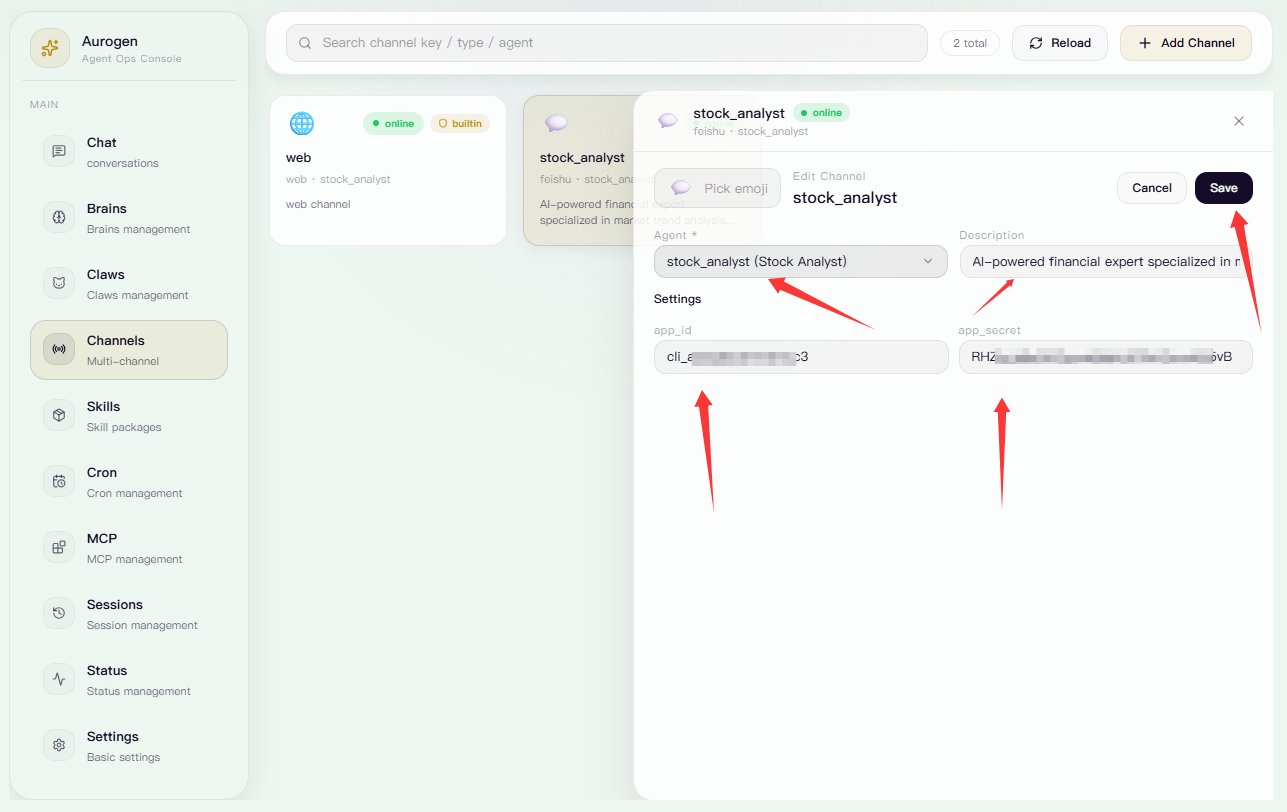
可以修改 Channel 对应的 Claw、Channel 描述，以及飞书应用的 App ID 和 App Secret。完成修改后，点击保存并退出。

<Frame>
  <img src="https://mintcdn.com/123-1747710f/hicXfbE48ouSJ5OY/images/image-62.png?fit=max&auto=format&n=hicXfbE48ouSJ5OY&q=85&s=c5ef737b92495cdb3b925c6f4d567c62" alt="Image" width="1287" height="812" data-path="images/image-62.png" />
</Frame>